
总 Stars
★ 34,398
本月 +
+8,213
Forks
4,698
贡献者
93
未解 Issues
27
最近提交
2026/10/12
TL;DR · 一句话理解
提供大量免费LLM模型和端点,支持智能路由和自动故障转移。
📈 为什么最近上榜
提供大量免费资源,满足开发者对LLM模型的需求,近期增长迅速。
🇨🇳 国内开发者价值
为国内开发者提供丰富的免费LLM资源,助力AI项目实验和开发。
👥 谁该关注
AI开发者数据科学家机器学习爱好者
能做什么
适合需要大量免费LLM资源进行个人实验的开发者。
核心特性
- 1集成34个免费LLM提供商
- 2635个免费模型端点
- 3智能路由与自动故障转移
原文 README
在 GitHub 查看原文 ↗FreeLLMAPI
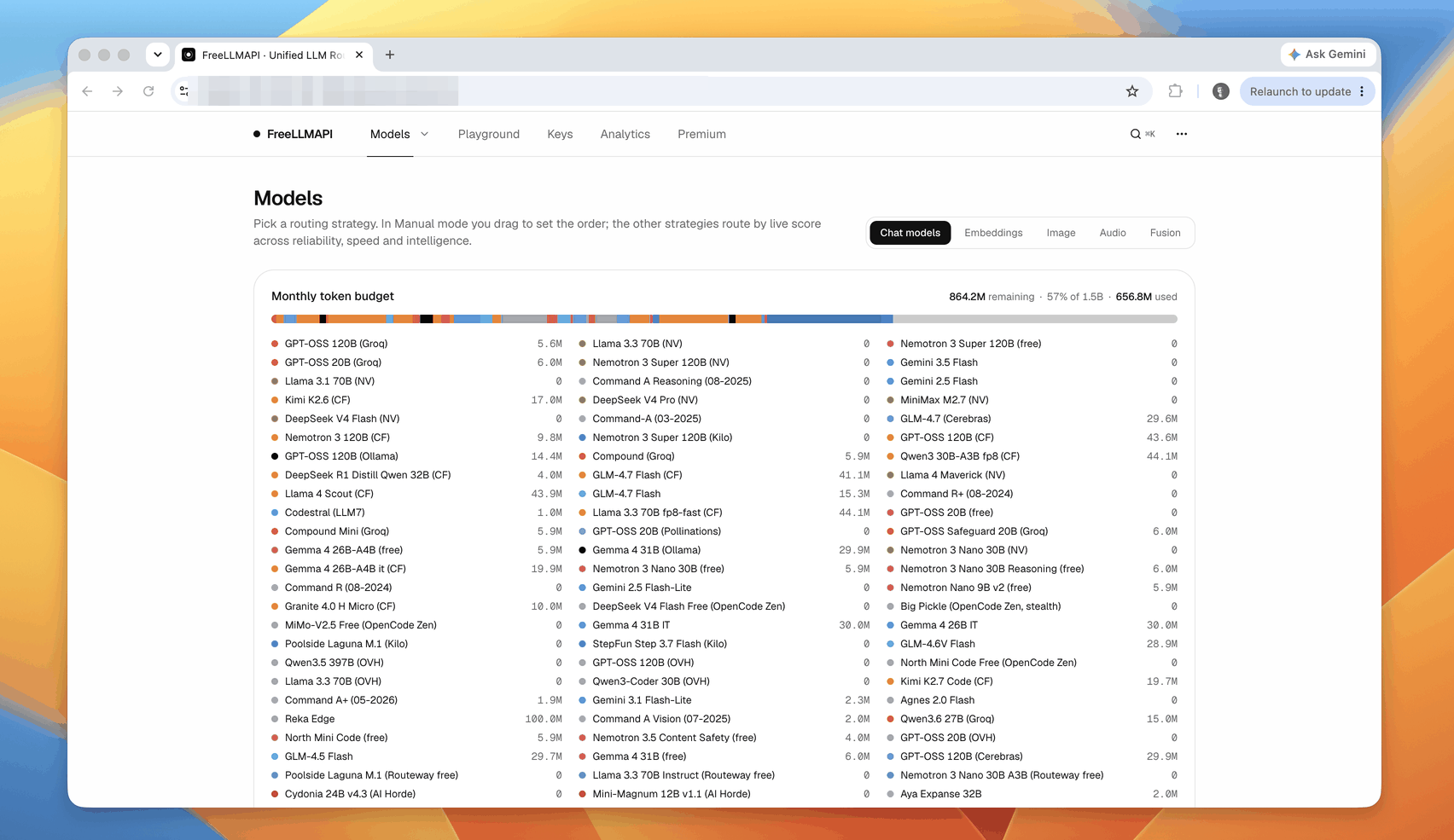
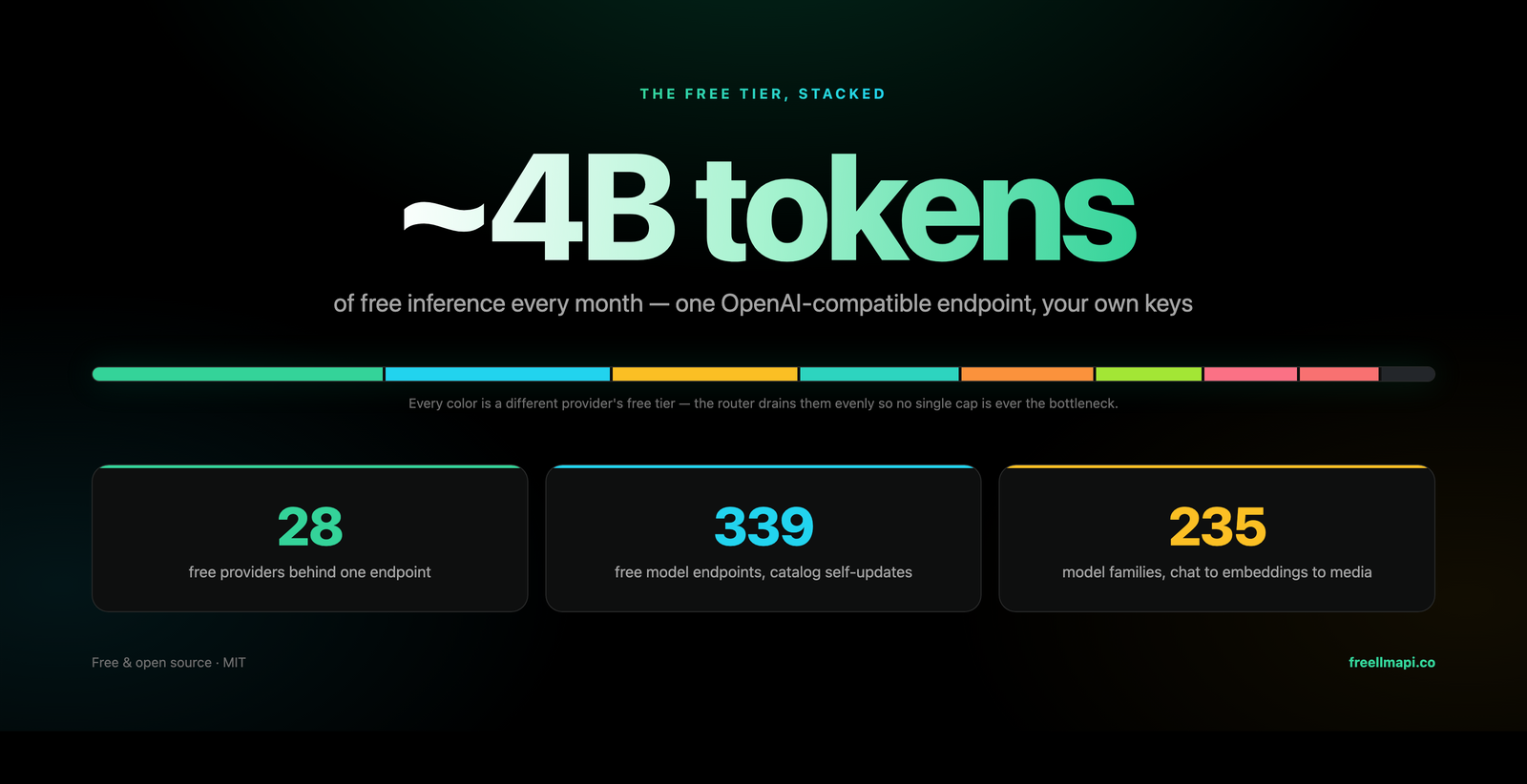
7.4 billion tokens per month. 34 free LLM providers. 635 free model endpoints. One OpenAI-compatible endpoint.
Aggregate free tiers from dozens of providers, plus custom OpenAI-compatible chat, embedding, image, and audio endpoints, behind a single /v1 API. Keys are stored encrypted. A router picks the best available model for each request, falls over to the next provider when one is rate-limited, and tracks per-key usage so you stay under every free-tier cap.




freellmapi.co · browse the full catalog: 474 model families, 635 free endpoints


Your router updates its own model catalog from a signed feed: new free models, quota changes, and compatibility fixes land without a git pull. Free installs get the monthly snapshot, so a model reaches them 30 days after it joins the live feed; premium routers get it the same day.
Go live at freellmapi.co ($19/yr, cancel anytime).
Contents
- Why this exists
- Supported providers
- Compatible CLIs & coding agents
- How it compares
- Features
- Quick start
- Desktop app
- Works with OpenAI-compatible clients
- Languages
- Premium (live catalog)
- Using the API
- Screenshots
- How it works
- FAQ
- Limitations
- Contributing
- Disclaimer
Guides: Install & deploy · API reference · Clients & coding agents · Prompt compression · Architecture & internals · Documentation index · Contributor guide
Why this exists
Every serious AI lab now offers a free tier, a few million tokens a month, a few thousand requests a day. On its own each tier is a toy. Stacked together, they add up to roughly 7.4 billion tokens per month of working inference capacity, across 474 model families / 635 provider endpoints from small-and-fast to reasonably capable.
The problem is that stacking them by hand is painful: thirty-four different SDKs, thirty-four different rate limits, thirty-four places a request can fail. FreeLLMAPI collapses that into one OpenAI-compatible endpoint. Point any OpenAI client library at your local server, and it routes transparently across whichever providers you've added keys for.
And the free-tier landscape shifts weekly: providers launch models, retire them, and change quotas without notice. FreeLLMAPI tracks all of that for you. The router pulls a signed model catalog from freellmapi.co on its own, so your install keeps up without a git pull. See Premium (live catalog) for how fast it keeps up.
Supported providers
 |
 Groq |
 Cerebras |
 OpenCode Zen |
 Mistral |
 OpenRouter |
 Cloudflare |
 Cohere |
 Z.ai (Zhipu) |
 NVIDIA |
 HuggingFace |
|
| ModelScope Qwen3 · DeepSeek V4 · GLM-5 (needs Aliyun cn binding) |
… and 22 more free providers
Plus a custom provider — point chat, embedding, image, or audio models at any OpenAI-compatible endpoint (llama.cpp, LM Studio, vLLM, a local Ollama, or a remote gateway) from the Keys page.
The full, always-current list lives at freellmapi.co/models with per-model rate limits, context windows, and free-token budgets.
Compatible CLIs & coding agents
 Claude Code |
 Codex CLI |
 Gemini CLI |
 Cursor |
 Cline |
 Roo Code |
 OpenCode |
 Aider |
… plus Continue, Goose, Qwen Code, Kilo Code, Crush, Zed, JetBrains AI, DeepSeek Harness, MiMo Code, AtomCode, OpenClaw, Hermes Agent, Pi, Reasonix and any OpenAI-compatible, Anthropic, Gemini or Ollama client
Most agents configure themselves with one command that reads your live catalog, backs up the existing config and merges into it:
npx freellmapi setup-claude --url http://localhost:3001 --api-key <unified-key>
All supported agents and their setup commands → · Per-tool recipes, MCP server and URL tokens →
How it compares
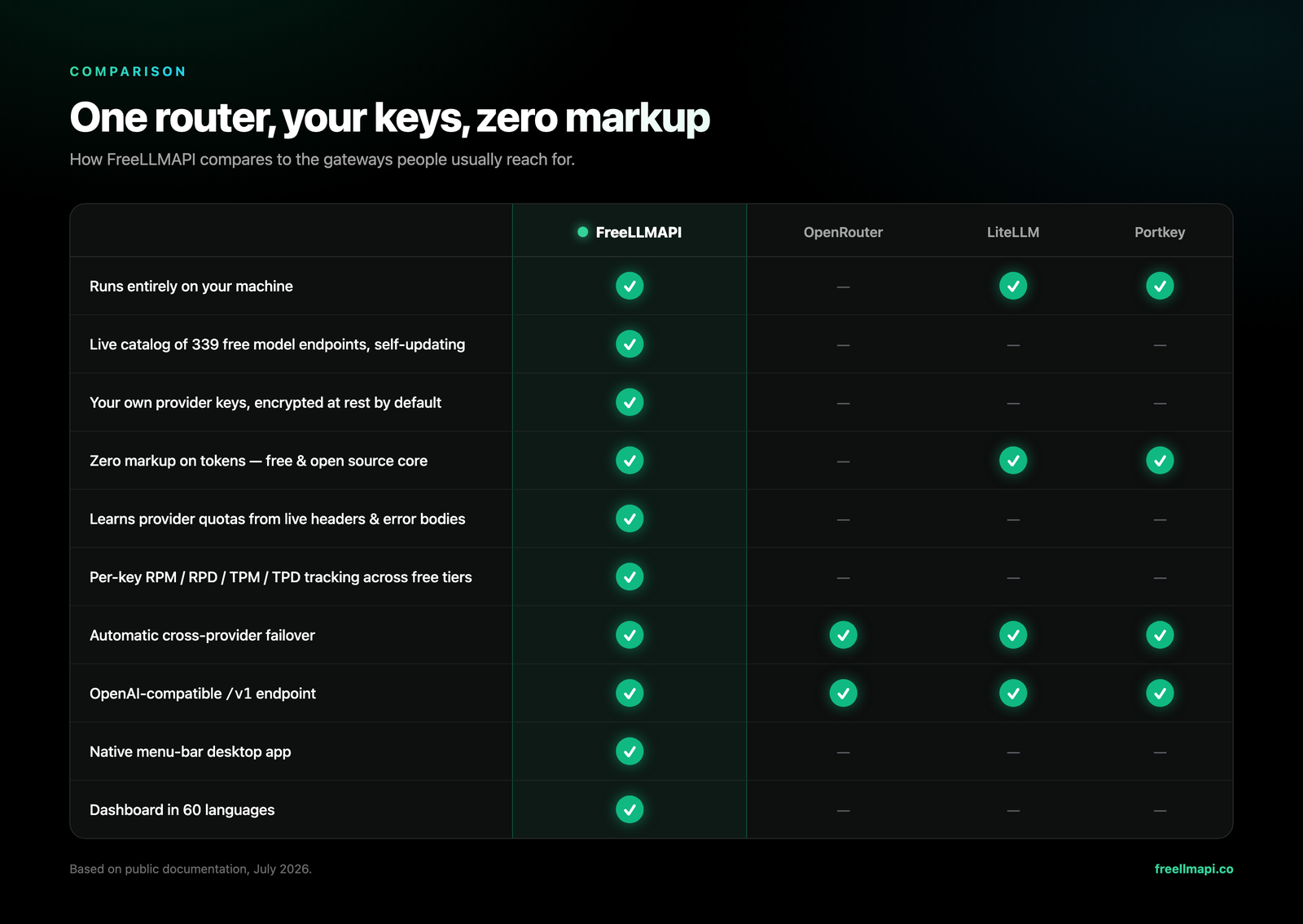
Based on public documentation, July 2026 — corrections welcome.
Features
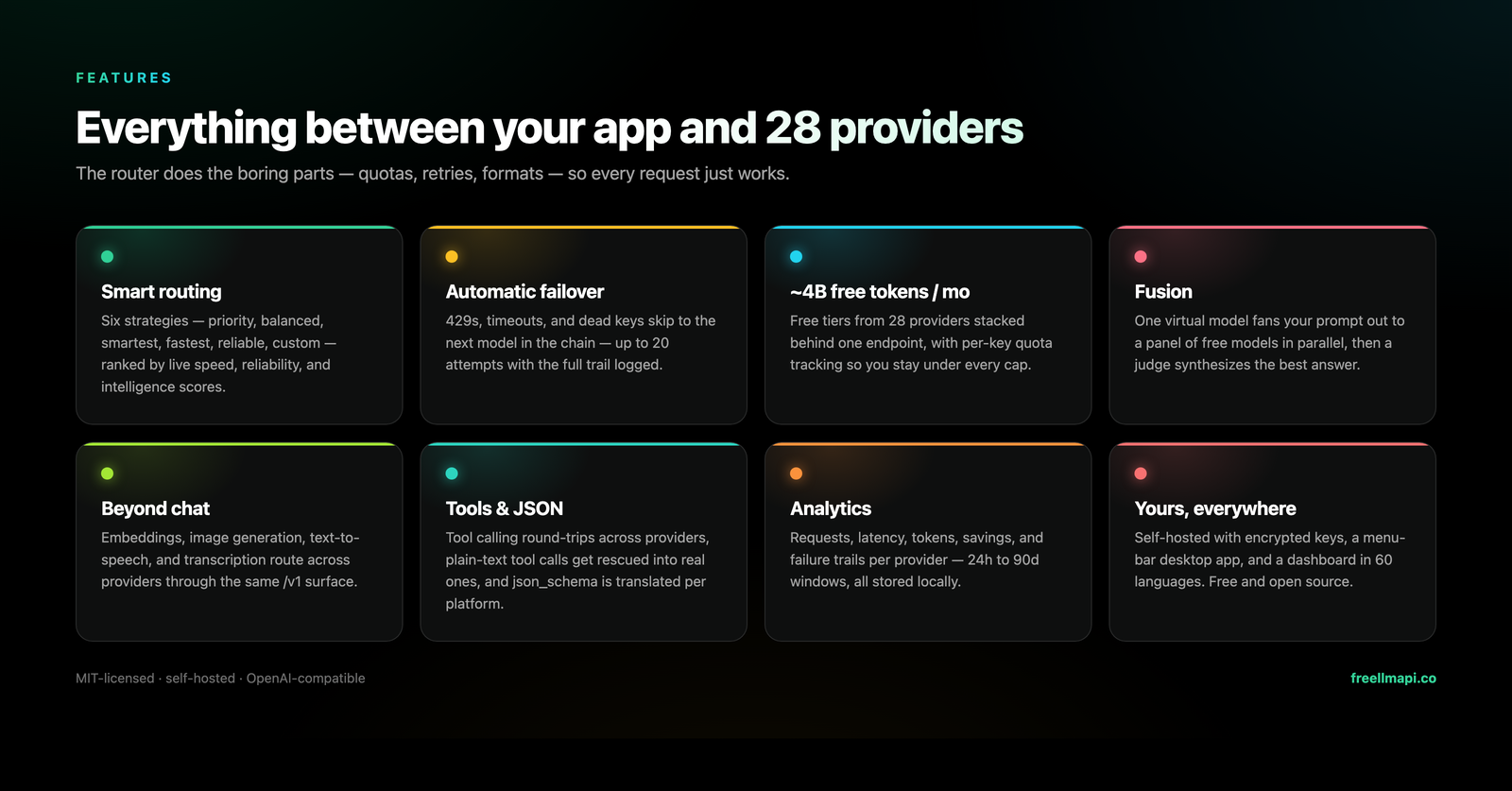
- Every OpenAI-style surface —
/v1/chat/completions,/v1/responses(what Codex CLI needs),/v1/completions(editor ghost-text autocomplete),/v1/images/generations,/v1/videos/generations,/v1/audio/speech,/v1/audio/transcriptions,/v1/embeddings, and/v1/models— streaming and non-streaming, from the official SDKs or any OpenAI-compatible client. API reference → - Anthropic Messages API —
/v1/messagesspeaks Anthropic's wire format over the same router, so Claude Code and the official Anthropic SDKs run against your free pool. Details → - Native Gemini + Ollama surfaces — Gemini CLI can use
/v1beta(generateContent, streaming, token counting, models), while opt-in Ollama emulation serves NDJSON chat/generate, tags, metadata, and embeddings for Zed, JetBrains, and other local-model clients. - Fusion (multi-model synthesis) — request the virtual
fusionmodel and the router fans your prompt out to a panel of diverse free models in parallel, then a judge model synthesizes one answer from the drafts. Details → - Image, video & speech generation —
/v1/images/generations,/v1/videos/generations, and/v1/audio/speechroute across the providers that serve media models; images and speech also accept custom OpenAI-compatible media endpoints. Video jobs are normalized across synchronous and queued providers and return a completed MP4. - Tool calling & structured outputs — OpenAI-style
toolsround-trip across providers (plain-text tool calls are rescued into realtool_calls), plusresponse_format,seed,logprobs, penalties, and the rest of the sampling params passed through per provider. - Smart routing, six strategies — live per-model speed/capability/reliability scores rank your chain; automatic fallover retries the next model on 429/5xx with cooldowns and key rotation. Routing in detail →
- Unified models & profiles — the same model on several providers collapses into one entry with strict in-group failover; named fallback-chain profiles (a coding chain, a vision chain) switch from the dashboard or per request via
auto:<profile>, and custom chains can be renamed in place from the chain manager. - Per-key rate tracking — RPM/RPD/TPM/TPD counters per
(platform, model, key)that learn providers' reported ceilings, so routing always stays under every cap. - Self-updating model catalog — the router syncs a signed catalog from freellmapi.co twice a day: new models, quota changes, and provider quirk fixes land automatically. Free installs track the monthly snapshot, which each model joins 30 days after it lands in the live feed; premium routers get it same-day. Premium →
- Sticky sessions & context handoff — conversations stay on one model for 30 minutes; an optional compact handoff note keeps the thread coherent when a mid-chat switch does happen. Details →
- Prompt compression (opt-in) — a shared, fail-open request pipeline can deduplicate prompts, filter tool output, compact repeated JSON, and trim stale context before cache lookup and routing. Details →
- Encrypted keys, one token out — provider keys are AES-256-GCM encrypted in SQLite and decrypted in-memory per request; your apps only ever see a single unified
freellmapi-…bearer token. - Admin dashboard & analytics — React UI to manage keys, reorder the chain, run a playground, and read p50/p95/TTFT analytics over 24h–90d windows; login-gated, dark/light themes, 60 languages.
- ChatGPT-ready MCP server & interactive docs — ChatGPT and other MCP clients can call FreeLLMAPI inference, list usable models, inspect provider health/usage/cache/routing metadata, and manage the routing strategy over
/mcp; a dependency-free OpenAPI viewer lives at/v1/docs. ChatGPT and coding agents → - Ops niceties — opt-in response cache, encrypted DB backups, periodic key health checks, bulk key import/export, declarative startup config. Install & deploy →
- Runs anywhere Node 20+ runs — Windows, macOS, Linux servers, or a small ARM SBC (Raspberry Pi included). ~40 MB RSS at idle behind PM2 / systemd / whatever supervisor you prefer.
The scope is deliberately narrow — see what's not supported yet.
Quick start
One-liner (Docker required — sets up ~/freellmapi, generates an encryption key, pulls the image, and starts the container):
curl -fsSL https://freellmapi.co/install.sh | bash
Prefer to read before you pipe to bash? The script is here. Re-running it is safe: your .env (and encryption key) is preserved and the container updates to :latest.
Open http://localhost:3001, add your provider keys on the Keys page, reorder the Fallback Chain to taste, and grab your unified API key from the Keys page header. That unified key is what you point your OpenAI SDK at.
On Windows, the easiest path is the desktop .exe installer from Releases (below). On Android, see the experimental Termux guide.
Everything else — Docker Compose, local development, declarative startup config, production builds, LAN access, and backups — is in docs/en/install/01-install.md.
Desktop app
A native menu-bar app lives in desktop/: the entire router + dashboard running locally from your tray, with a glass popover showing live request stats.
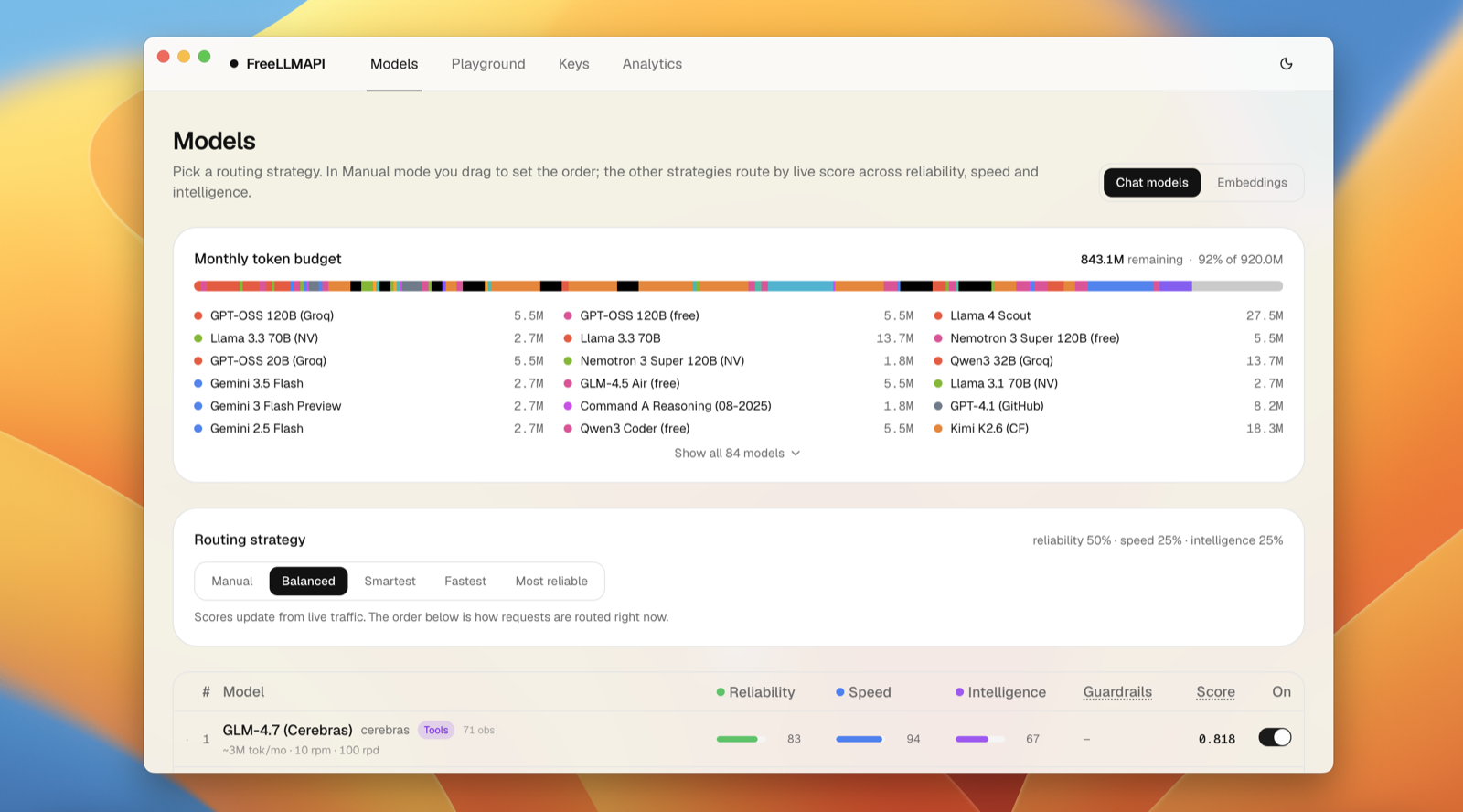
Download from Releases — the macOS .dmg and the Windows .exe installer are attached to every release. No account or password to set up: the only credential you need is the unified API key from the tray popover. Build-from-source steps and where your data lives: docs/en/install/01-install.md#desktop-app.
For macOS 12 Monterey or later, choose arm64 (Apple Silicon) or x64 (Intel). Both Mac builds also include a ZIP download.
Works with OpenAI-compatible clients
Anything that can target an OpenAI-compatible base URL works: set it to http://localhost:3001/v1 with the unified key from the dashboard. Every generator supports --dry-run; npx freellmapi launch (Claude Code) and launch-codex (Codex) keep credentials out of config files entirely. The router also doubles as an MCP server your agents can introspect mid-session.
ChatGPT connects to the same local router through a private Secure MCP Tunnel. The
ask_freellmapi MCP tool routes a ChatGPT-requested task through /v1/chat/completions and
returns the answer with served-model, fallback, cache, execution, and token metadata. Base
URL and bearer authentication live in the tunnel-client configuration; the default model is
set with MCP_INFERENCE_DEFAULT_MODEL (auto when unset). No key belongs in Git or in the
MCP URL. ChatGPT setup →
Provider keys can be managed from the terminal too, with a dashboard session token (FREELLMAPI_DASHBOARD_TOKEN or --token): npx freellmapi keys add|list|remove|test <platform>, where keys test re-checks stored keys. See cli/README.md.
FreeLLMAPI is local-first and single-user by design. Your provider keys stay in your SQLite database, encrypted at rest, and requests go from your machine to the upstream providers you enabled.
Languages
The dashboard ships in 60 languages (the desktop tray menu in 6). The UI auto-detects your browser/system language on first load and you can switch any time from ⋯ → Settings; the choice is remembered. Right-to-left languages (العربية, עברית, فارسی, اردو) flip the whole layout automatically, and only the active language's dictionary is loaded — the rest never touch your bandwidth.


The full list of locales lives in
client/src/i18n/locale-config.ts.
The original six locales are human-reviewed; the newer ones are machine- translated and improve as native speakers send corrections — a one-string PR is a great first contribution.
Translations live in client/src/i18n/locales/ as
flat JSON files. To fix a string, edit the value in the locale's JSON file. To
add a language, copy en.json, translate the values, and register the locale in
client/src/i18n/locale-config.ts (and desktop/src/i18n.ts for the tray
strings); npm test checks every locale for key/placeholder parity — PRs
welcome.
Premium (live catalog)
The router keeps its model catalog fresh on its own: it pulls a signed catalog from freellmapi.co twice a day and applies new models, quota changes, and provider quirk fixes to your local DB. Your own enable/disable choices and custom providers are never touched, and every download is verified against a pinned Ed25519 key before it is applied.
The catalog currently tracks 34 providers, 474 model families, 635 free provider/model endpoints (584 chat, 41 embeddings, 7 transcription, 3 video), and roughly 7.4 billion tokens per month of listed free-tier capacity. Browse the full set at freellmapi.co/models.
Free installs pull the same signed catalog, but from the monthly snapshot: a model joins it 30 days after it lands in the live feed, so the free build currently sits about 303 models behind. Nothing expires and nothing is crippled — it just arrives later.
Premium keeps that signed catalog live on every router you run. When a provider launches a strong free model, quietly tightens a quota, or breaks a wire format, live-feed routers receive the update the same day we ship it.
- $19/year or $49 once, lifetime. Stripe checkout; cancel anytime, self-serve.
- One
fla_key covers every router you run: desktop, homelab, Raspberry Pi. - Activate in the dashboard under Premium; cancel or manage billing self-serve at freellmapi.co/manage.
- The router itself stays MIT-licensed and fully free, forever. Premium is only the live feed, and it's what funds the daily model testing and catalog maintenance that keeps the catalog working.
The catalog server never sees your prompts, completions, or provider keys — the router stays fully self-hosted either way.
Using the API
from openai import OpenAI

client = OpenAI(
    base_url="http://localhost:3001/v1",
    api_key="freellmapi-your-unified-key",
)

resp = client.chat.completions.create(
    model="auto",  # let the router pick; or "auto:fast", "auto:smart", a profile, or a model id
    messages=[{"role": "user", "content": "Summarise the fall of Rome in one sentence."}],
)
print(resp.choices[0].message.content)
print("Routed via:", resp.headers.get("x-routed-via"))
Streaming, the auto:* routing strategies, tool calling, vision input, Gemini Google Search grounding, embeddings, and the Anthropic Messages surface — with curl and Python examples for each — are all in docs/en/api/01-rest-api.md. Every response carries an X-Routed-Via: <platform>/<model> header so you can see which provider actually served it.
Screenshots
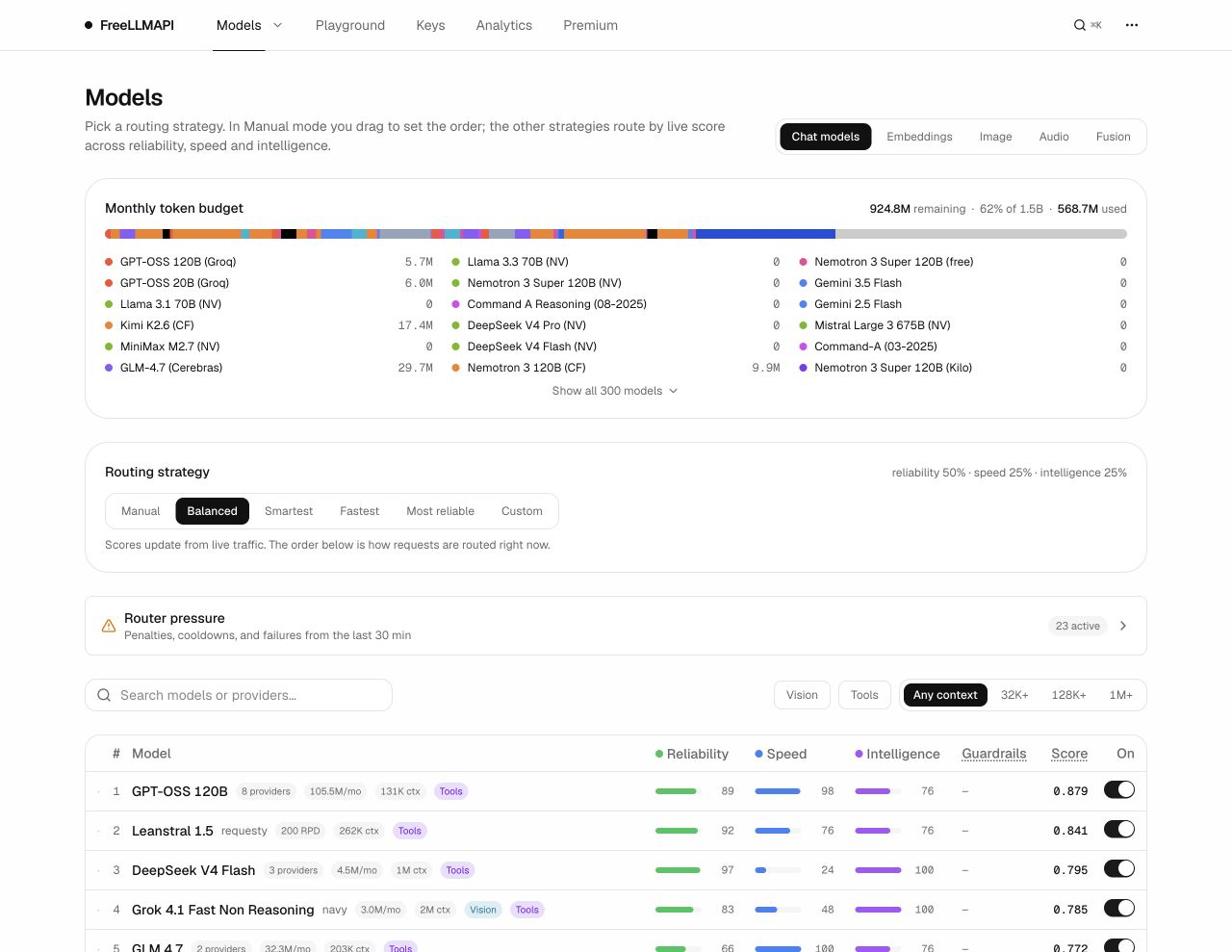
Models
Pick a routing strategy and watch the monthly token budget fill across the whole provider fleet. Every model shows live reliability, speed, and intelligence scores — the order below is how requests route right now.
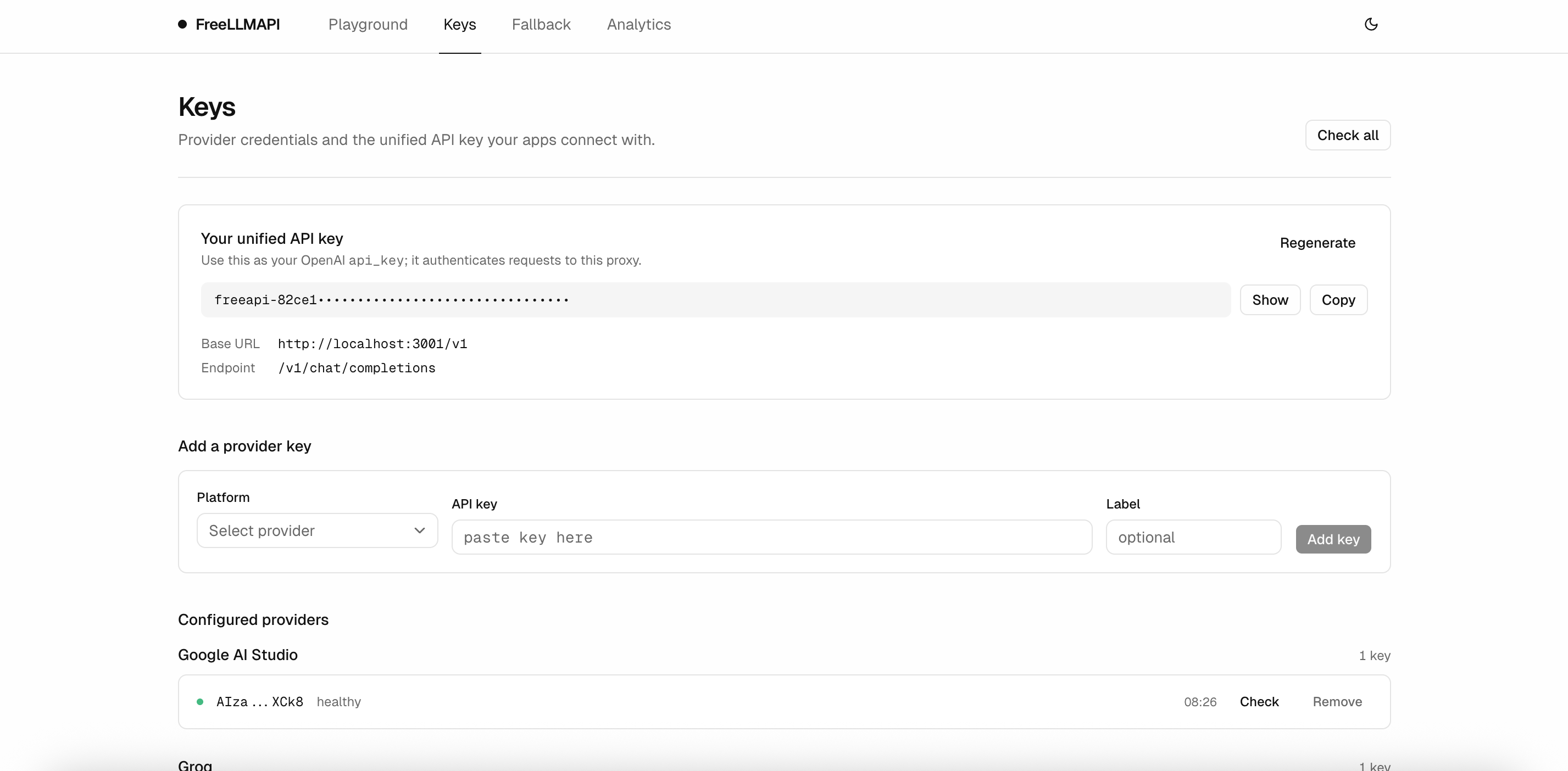
Keys
Manage provider credentials and grab the unified API key your apps connect with. Each key shows a status dot and when it was last health-checked.
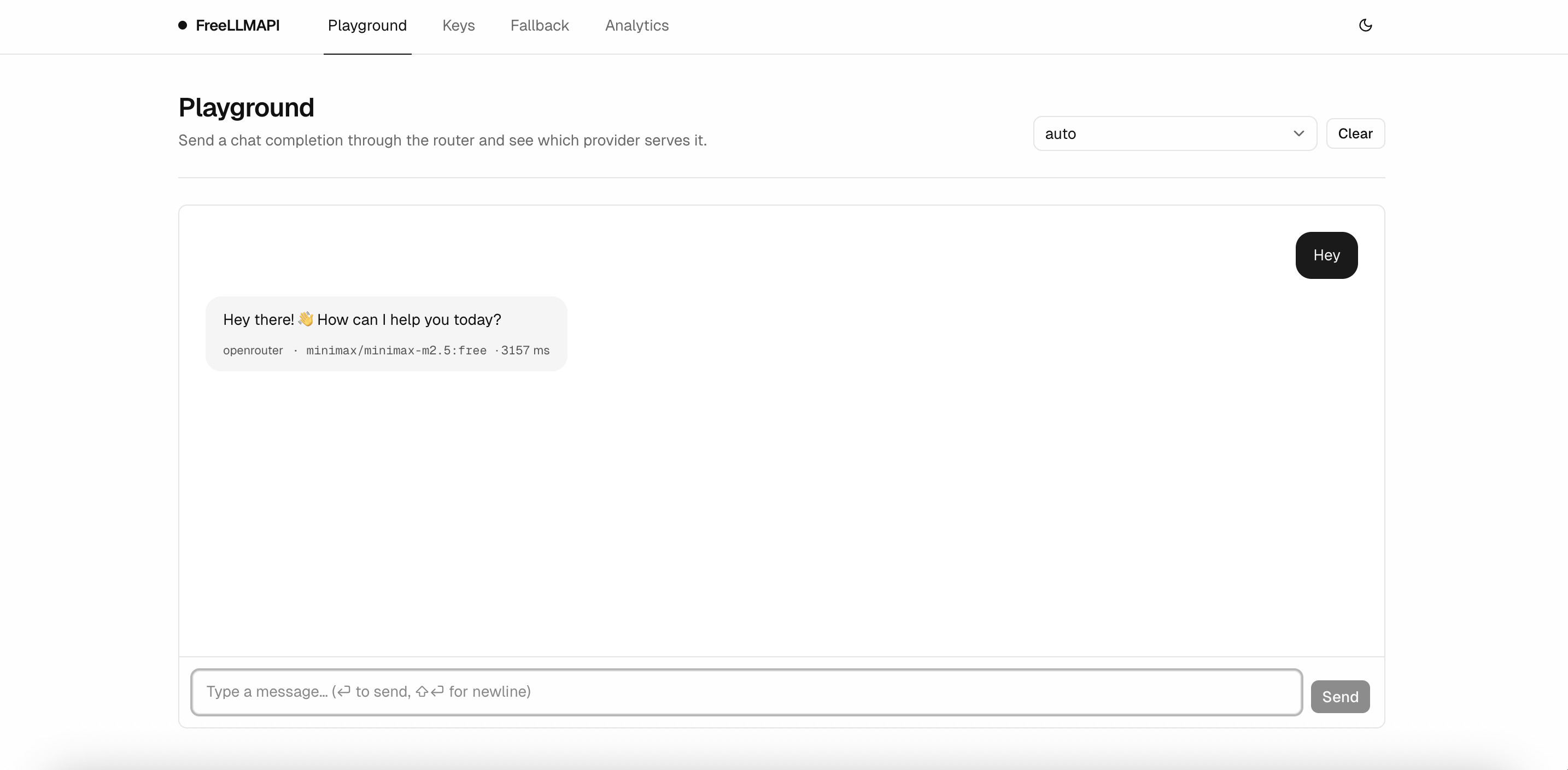
Playground
Send a chat completion through the router and see which provider served it, with the model ID and latency printed right on the message. Attach files by button, drag-and-drop, or paste: images (PNG/JPEG/WebP/GIF) are downscaled in the browser and sent as image content parts to a vision-capable model, and text files (TXT/MD/CSV/JSON/LOG) are inlined into the prompt as fenced blocks.
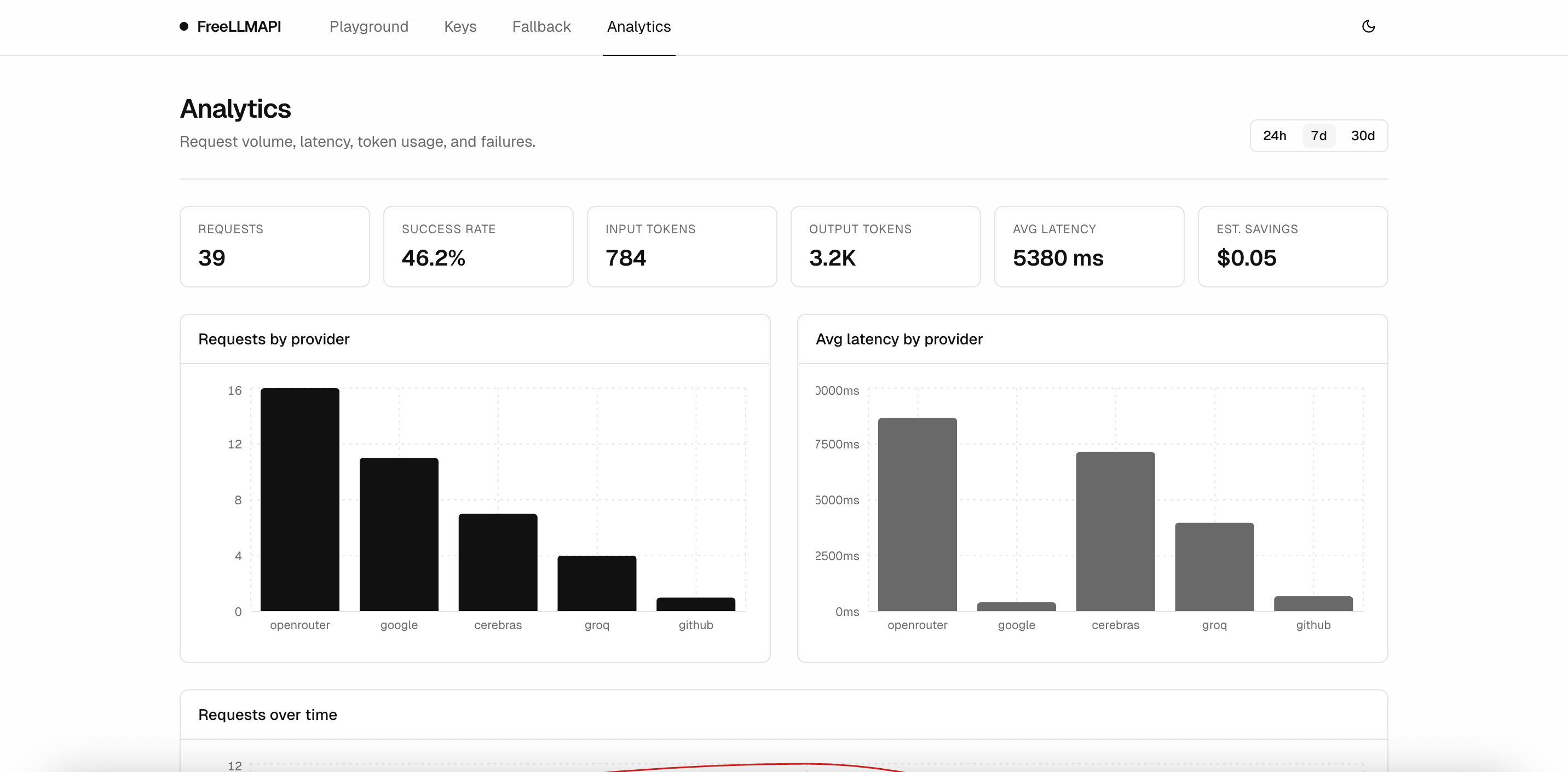
Analytics
Request volume, success rate, tokens in and out, average latency, and per-provider breakdowns over 24h / 7d / 30d / 90d windows.
How it works
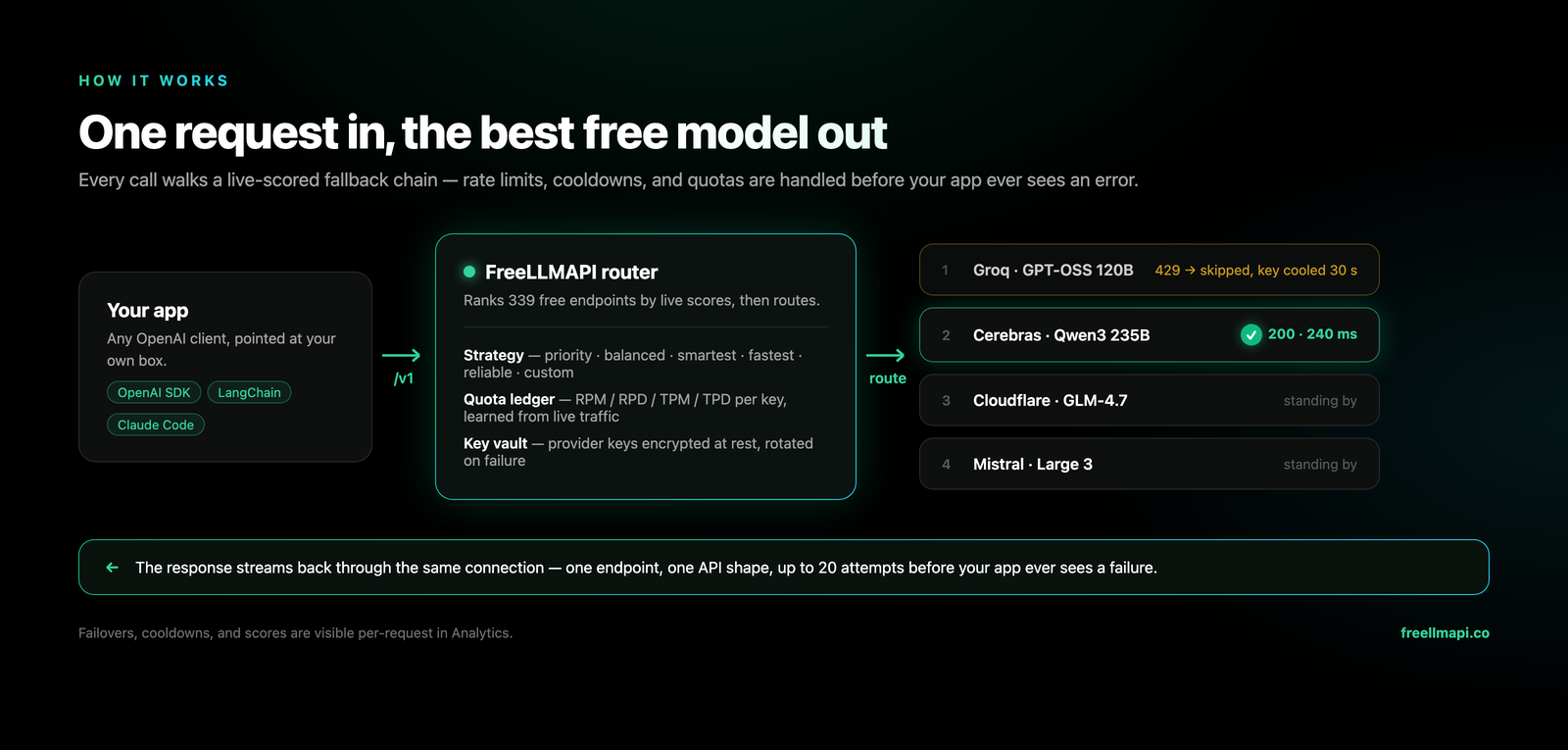
One request in, the best free model out: the router picks the highest-priority model with a healthy key that's under all its rate limits, decrypts the key in memory, and calls the provider — on a 429/5xx it cools that key down and retries the next model in your chain. The component walkthrough, routing internals, and operational details live in docs/en/architecture/00-high-level-index.md.
FAQ
Do I need a password? Not for the desktop app — the dashboard signs itself in with a hidden local account, so there is nothing to set up and nothing to forget. Open it from the tray icon → Open Dashboard. Server installs (Docker, one-liner, npm run dev) do have an email + password account.
I forgot the password on a server install. Click Forgot password? on the login page. There is no email to send a link to, so the one-time code is printed to the server log — read it with docker compose logs -f freellmapi (or in the terminal running the server, or in the desktop log file), then enter it on the reset form. The code lasts 15 minutes.
Where are the logs? In the container log for Docker, in the terminal for a source run, and in <data dir>/logs/freeapi.log for the desktop app — reachable from the tray menu's Open Logs Folder.
How do I uninstall? Remove the app (Trash on macOS, Settings → Apps on Windows, docker compose down -v for Docker), then delete the data directory: %APPDATA%\FreeLLMAPI\, ~/Library/Application Support/FreeLLMAPI/, or ~/.config/FreeLLMAPI/. Uninstalling never touches that folder on its own.
Longer answers, per install method: docs/en/install/01-install.md#faq-passwords-logs-uninstall.
Limitations
Stacking free tiers has real trade-offs: no frontier models, variable latency, no SLA — and the effective intelligence of the endpoint dips late in the day as top models hit their daily caps, then resets at UTC midnight. Read the honest list in docs/en/architecture/00-high-level-index.md#limitations before building anything real on this.
Contributing
Contributors very welcome! See CONTRIBUTING.md for the dev loop, PR expectations, and the policy on AI/LLM-assisted contributions (short version: welcome, same quality bar as any other PR). Good first PRs:
- Add a provider — copy
server/src/providers/openai-compat.tsas a template, wire it intoserver/src/providers/index.ts, seed its models inserver/src/db/index.ts, add a test inserver/src/__tests__/providers/. - Add an endpoint — other OpenAI-compatible surfaces (e.g.
/v1/realtime). The provider base class can grow new methods; adapters declare which they support. - Improve the router — cost-aware routing (cheapest-healthy-fastest tradeoffs), better latency-weighted priority, regional pinning.
- Dashboard polish — charts on the Analytics page, key rotation UX, batch import of keys from
.env. - Docs — more examples, client library snippets for Go/Rust/etc., a deployment recipe for Docker or Fly.
npm install && npm run dev gets you the server on :3001 and the dashboard on :5173, both with HMR. For a repeatable setup, use ./scripts/dev-bootstrap.sh on Bash or .\scripts\dev-bootstrap.ps1 on PowerShell; each preserves an existing .env. PRs should include a test, keep the existing suite green (npm test), and match the .editorconfig / tsconfig defaults already in the repo. Database migration workflow and the full contributor loop are in CONTRIBUTING.md.
Contributors


Disclaimer
This project is for personal experimentation and learning, not production. Free tiers exist so developers can prototype against them; they aren't a stable, supported inference substrate and shouldn't be treated as one. If you build something real on top of FreeLLMAPI, swap in a paid API before you ship. Your relationship with each upstream provider is governed by the terms you accepted when you created your account — those terms still apply when the traffic is proxied through this project, and you're responsible for complying with them.
How each provider's ToS views a personal, single-user proxy — reviewed provider by provider in May 2026 — is in docs/en/architecture/00-high-level-index.md#terms-of-service-review.
License
类似的项目
同属 开发工具 类型 · 适合同类用户的其他选择