
总 Stars
★ 1,621
今日 +
+98
Forks
172
贡献者
58
未解 Issues
91
最近提交
2026/6/12
TL;DR · 一句话理解
本地优先的编码Agent会话智能分析,支持20+Agent且性能是ccusage的100倍
📈 为什么最近上榜
AI编码助手流行,用户急需高效本地分析工具;今日98 stars增长反映开发者的强烈需求
🇨🇳 国内开发者价值
国内AI编码用户可本地分析多种Agent会话,优化使用习惯与成本,数据不出网
👥 谁该关注
AI编码助手用户开发者与运维工程师工具效率爱好者
能做什么
用于分析Claude Code、Codex等编程Agent的会话数据,优化使用效率与成本
核心特性
- 1本地优先,数据隐私安全可靠
- 2支持Claude Code、Codex等20余种Agent
- 3性能比ccusage快100倍
原文 README
在 GitHub 查看原文 ↗agentsview
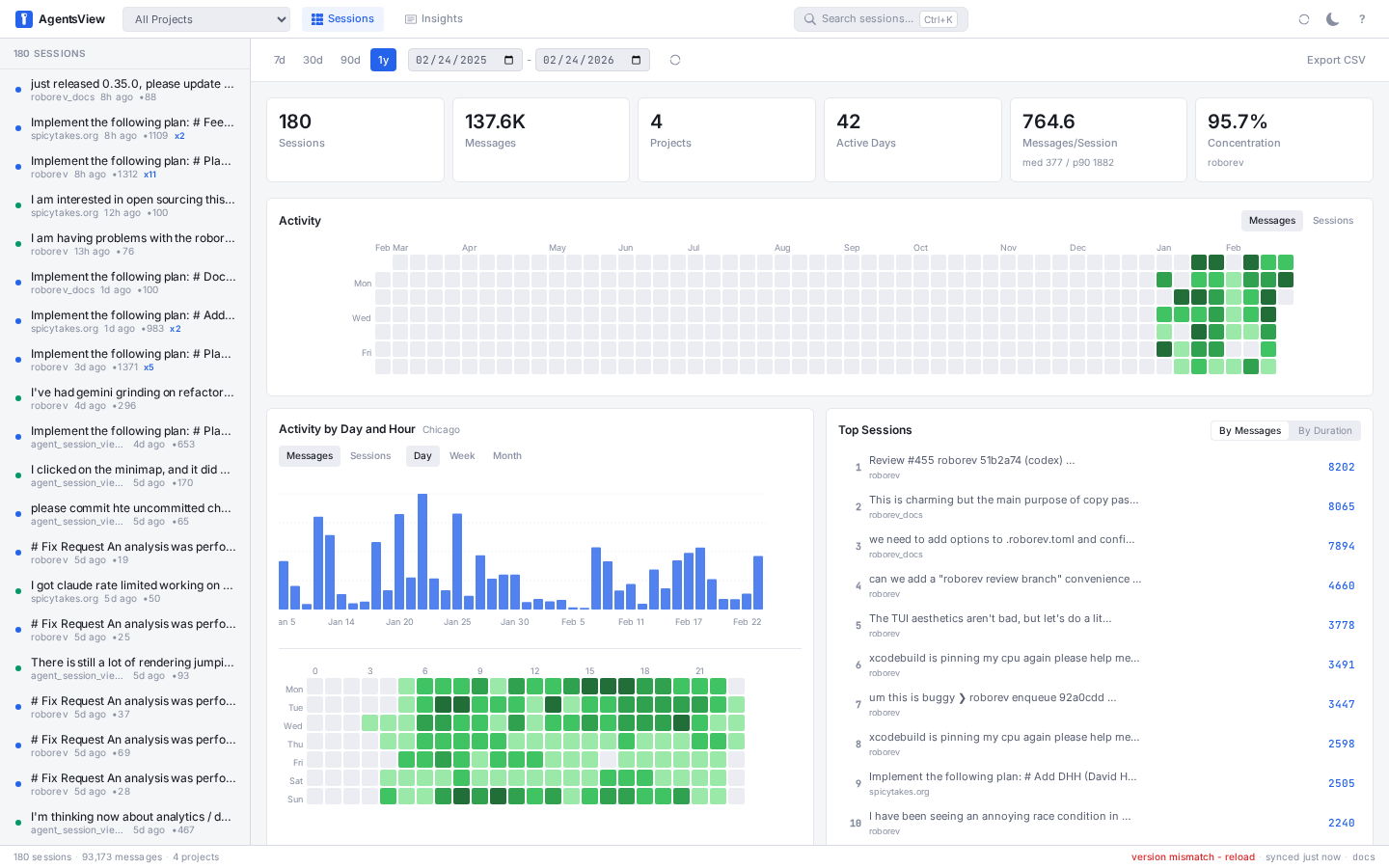
Browse, search, and track costs across all your AI coding agents. One binary, no accounts, everything local.
Install
# macOS / Linux
curl -fsSL https://agentsview.io/install.sh | bash

# Windows
powershell -ExecutionPolicy ByPass -c "irm https://agentsview.io/install.ps1 | iex"
Or download the desktop app (macOS / Windows) from
GitHub Releases or via
homebrew: brew install --cask agentsview
Or run the published Docker image:
docker run --rm -p 127.0.0.1:8080:8080 \
  -v agentsview-data:/data \
  -v "$HOME/.claude/projects:/agents/claude:ro" \
  -v "$HOME/.forge:/agents/forge:ro" \
  -e CLAUDE_PROJECTS_DIR=/agents/claude \
  -e FORGE_DIR=/agents/forge \
  ghcr.io/kenn-io/agentsview:latest
Quick Start
agentsview serve           # start server, open web UI
agentsview usage daily     # print daily cost summary
On first run, agentsview discovers sessions from every supported agent on your
machine, syncs them into a local SQLite database, and opens a web UI at
http://127.0.0.1:8080.
Remote / forwarded access
agentsview binds to loopback and validates the request Host header to guard
against DNS-rebinding attacks. When you reach it through SSH port-forwarding, a
reverse proxy, or a remote dev environment (exe.dev, Codespaces, Coder, WSL2),
the browser sends a Host that the server does not recognize, so API requests
such as /api/v1/settings are rejected with 403 Forbidden.
To fix this, restart the server with --public-url set to the exact origin you
open in the browser:
# Browser opens http://127.0.0.1:18080 via `ssh -L 18080:127.0.0.1:8080 host`
agentsview serve --public-url http://127.0.0.1:18080

# Browser opens a forwarded hostname
agentsview serve --public-url https://your-workspace.exe.dev
Use --public-origin (repeatable or comma-separated) to trust additional
browser origins. If you expose the UI beyond loopback, also enable
--require-auth.
Docker
The container image defaults to local agentsview serve. Set PG_SERVE=1 to
switch the startup command to agentsview pg serve instead.
docker-compose.prod.yaml is included as a production example:
docker compose -f docker-compose.prod.yaml up -d
The included compose file persists the agentsview data directory in a named
volume and mounts Claude, Codex, Forge, and OpenCode session roots read-only.
The container runs as root, so prefer a named volume for /data over a host
bind mount; if you do bind-mount, pre-create the directory with the desired
ownership to avoid root-owned files in your home directory.
The examples publish the UI on loopback only (127.0.0.1). If you need to
expose it beyond localhost, enable --require-auth and publish the port
intentionally.
Important: a containerized agentsview instance can only discover agent sessions from directories you explicitly mount into the container. If you do not mount an agent's session directory and point the matching env var at it, that agent will not appear in the UI.
Example PostgreSQL-backed startup:
docker run --rm -p 127.0.0.1:8080:8080 \
  -e PG_SERVE=1 \
  -e AGENTSVIEW_PG_URL='postgres://user:password@postgres.example.com:5432/agentsview?sslmode=require' \
  ghcr.io/kenn-io/agentsview:latest
Example DuckDB mirror startup:
# Populate /data/sessions.duckdb from the mounted SQLite archive.
docker run --rm \
  -v agentsview-data:/data \
  -v "$HOME/.claude/projects:/agents/claude:ro" \
  -e CLAUDE_PROJECTS_DIR=/agents/claude \
  ghcr.io/kenn-io/agentsview:latest duckdb push --full

# Serve the populated mirror read-only.
docker run --rm -p 127.0.0.1:8080:8080 \
  -v agentsview-data:/data \
  ghcr.io/kenn-io/agentsview:latest duckdb serve
Example Quack startup:
# Expose the local DuckDB mirror over Quack from the host/container.
QUACK_TOKEN="$(openssl rand -base64 32)"
docker run --rm -p 127.0.0.1:9494:9494 \
  -v agentsview-data:/data \
  ghcr.io/kenn-io/agentsview:latest \
  duckdb quack serve \
    --bind quack:0.0.0.0:9494 \
    --token "$QUACK_TOKEN" \
    --allow-insecure

# Serve the web UI from a remote Quack endpoint.
docker run --rm -p 127.0.0.1:8080:8080 \
  -e AGENTSVIEW_DUCKDB_URL='quack:https://duckdb.example.com' \
  -e AGENTSVIEW_DUCKDB_TOKEN="$QUACK_TOKEN" \
  ghcr.io/kenn-io/agentsview:latest duckdb serve
Keep Quack on loopback or behind TLS. Plain HTTP Quack on a non-loopback bind
requires --allow-insecure and should only be used behind a trusted tunnel or
reverse proxy.
Token Usage and Cost Tracking
agentsview usage is a fast, local replacement for ccusage and similar tools.
It tracks token consumption and compute costs across all your coding agents
-- not just Claude Code. Because session data is already indexed in SQLite,
queries are over 100x faster than tools that re-parse raw session files on every
run.
# Daily cost summary (default: last 30 days)
agentsview usage daily

# Per-model breakdown
agentsview usage daily --breakdown

# Filter by agent and date range
agentsview usage daily --agent claude --since 2026-04-01

# One-line summary for shell prompts / status bars
agentsview usage daily --all --json
agentsview usage statusline
Features:
- Automatic pricing via LiteLLM rates (with offline fallback)
- Prompt-caching-aware cost calculation (cache creation / read tokens)
- Per-model breakdown with
--breakdown - Date filtering (
--since,--until,--all), agent filtering (--agent) - JSON output (
--json) for scripting - Timezone-aware date bucketing (
--timezone) - Works standalone -- no server required, just run the command
Per-Session Details
agentsview session usage <id> prints per-session token statistics plus a cost
estimate for a single session. The output reports the session's total output
tokens and peak context tokens, plus a cost estimate in USD (cost_usd) when
pricing is available for the session's model(s) (has_cost). Cost is computed
from input/output and cache tokens internally, but only the output-token and
peak-context totals are reported alongside the cost.
# Print token usage and cost for a specific session
agentsview session usage <id>

# JSON output for scripting
agentsview session usage <id> --format json
The same per-session usage data is available from the REST API:
GET /api/v1/sessions/{id}/usage
The response includes the session_id, agent, project,
total_output_tokens, peak_context_tokens, has_token_data, cost_usd,
has_cost, models, and unpriced_models fields from the CLI JSON schema.
HTTP responses also include server_running: true. Existing sessions return
200 even when token or cost data is absent; missing sessions return 404.
The deprecated alias agentsview token-use <id> remains available for
compatibility and now also reports cost estimates.
Session Stats
agentsview stats emits window-scoped analytics over recorded sessions: totals,
archetypes (automation vs. quick/standard/deep/marathon), distributions for
session duration, user-message count, peak context, and tools-per-turn, plus
cache economics, tool/model/agent mix, and a temporal hourly breakdown. The
--format json output follows a versioned v1 schema (schema_version: 1)
suitable for downstream consumers.
By default, stats only reads the local SQLite archive. Git-derived outcome
metrics are opt-in because they can be slow or brittle on large/missing repos:
use --include-git-outcomes for commits/LOC/files changed, and
--include-github-outcomes for GitHub PR counts via gh (this also enables git
outcomes).
# Human-readable summary over the last 28 days
agentsview stats

# Machine-readable JSON over a fixed date range
agentsview stats --format json --since 2026-04-01 --until 2026-04-15

# Restrict to one agent and inspect the schema
agentsview stats --format json --agent claude | jq '.schema_version'

# Include expensive local git outcome metrics explicitly
agentsview stats --include-git-outcomes
Session Browser
| Dashboard | Session viewer |
|---|---|
|
 |
| Search | Activity heatmap |
|---|---|
 |
 |
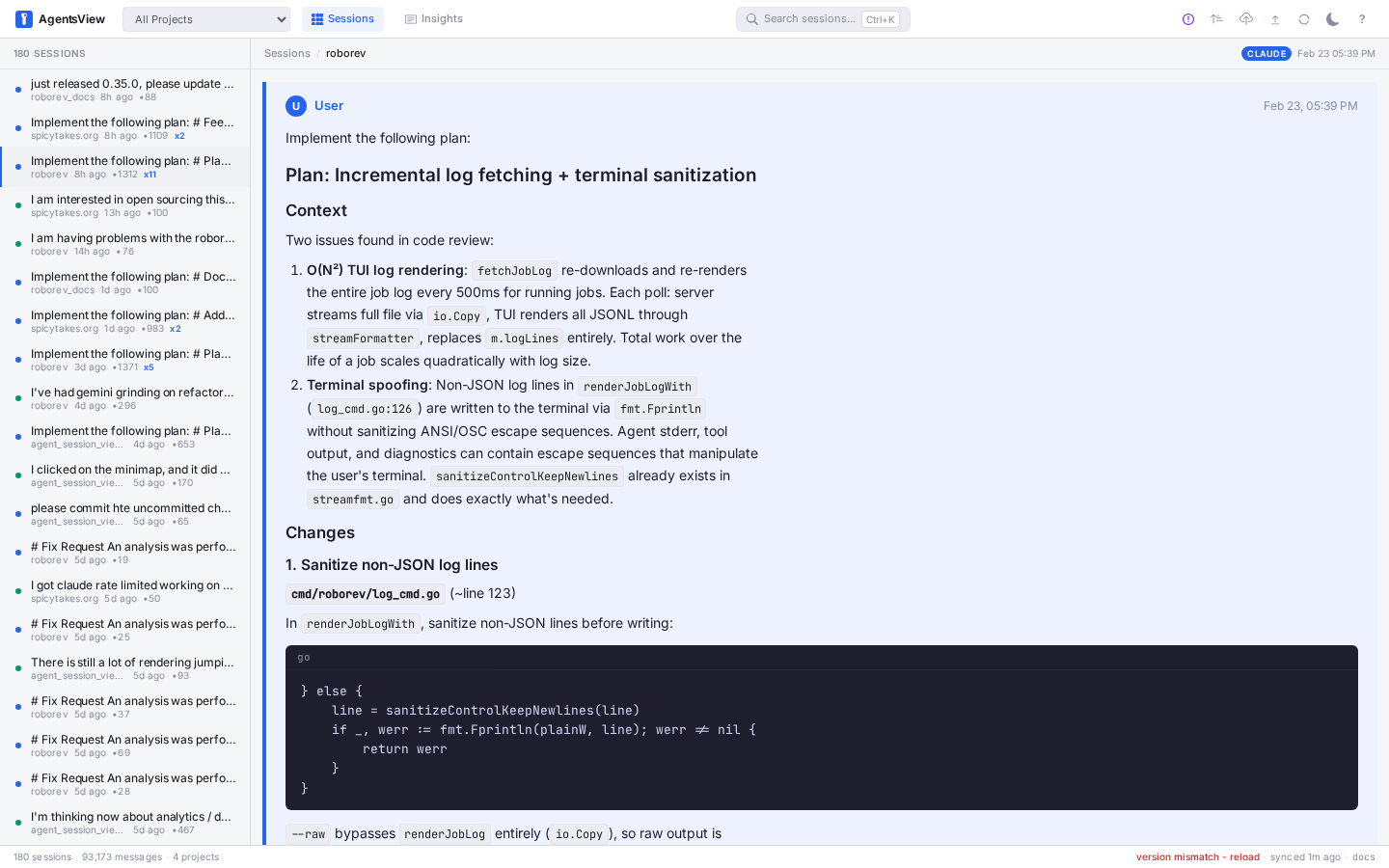
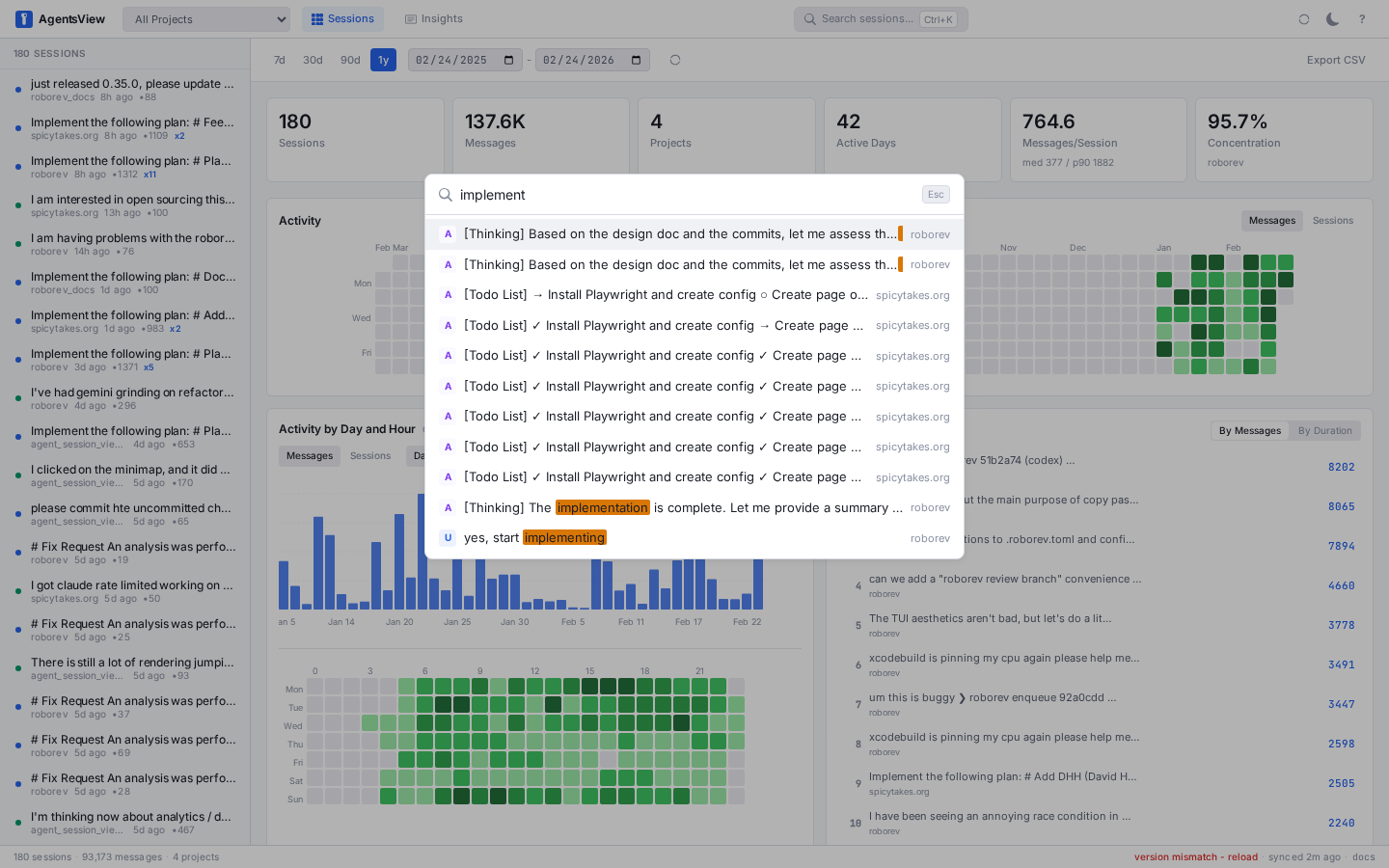
- Full-text search across all message content (FTS5)
- Token usage and cost dashboard -- per-session and per-model cost breakdowns, daily spend charts, all in the web UI
- Analytics dashboard -- activity heatmaps, tool usage, velocity metrics, project breakdowns
- Live updates via SSE as active sessions receive new messages
- Keyboard-first navigation (
j/k/[/],Cmd+Ksearch,?for all shortcuts) - Export sessions as HTML or publish to GitHub Gist
Supported Agents
agentsview auto-discovers sessions from all of these:
| Agent | Session Directory |
|---|---|
| Claude Code | ~/.claude/projects/ |
| Codex | ~/.codex/sessions/ |
| Copilot CLI | ~/.copilot/ |
| Gemini CLI | ~/.gemini/ |
| OpenCode | ~/.local/share/opencode/ |
| OpenHands CLI | ~/.openhands/conversations/ |
| Cursor | ~/.cursor/projects/ |
| Amp | ~/.local/share/amp/threads/ |
| iFlow | ~/.iflow/projects/ |
| Zencoder | ~/.zencoder/sessions/ |
| Zed | ~/Library/Application Support/Zed/ (macOS) |
| VSCode Copilot | ~/Library/Application Support/Code/User/ (macOS) |
| Pi | ~/.pi/agent/sessions/ |
| Qwen Code | ~/.qwen/projects/ |
| OpenClaw | ~/.openclaw/agents/ |
| QClaw | ~/.qclaw/agents/ |
| Kimi | ~/.kimi/sessions/ |
| Kiro CLI | ~/.kiro/sessions/cli/, ~/.local/share/kiro-cli/ |
| Kiro IDE | ~/Library/Application Support/Kiro/ (macOS) |
| Cortex Code | ~/.snowflake/cortex/conversations/ |
| Hermes Agent | ~/.hermes/sessions/ |
| WorkBuddy | ~/.workbuddy/projects/ |
| Forge | ~/.forge/ |
| Piebald | ~/.local/share/piebald/ |
| Warp | ~/.warp/ (platform-dependent) |
| Positron Assistant | ~/Library/Application Support/Positron/User/ (macOS) |
| Antigravity | ~/.gemini/antigravity/ |
| Antigravity CLI | ~/.gemini/antigravity-cli/ (see note below) |
Each directory can be overridden with an environment variable. See the configuration docs for details.
Antigravity CLI: high-resolution transcripts
Antigravity CLI sessions now appear in two on-disk formats. Newer releases store
conversation trajectories as SQLite .db files, which agentsview indexes
directly. Older releases stored assistant turns and tool calls in
AES-GCM-encrypted .pb files; for those sessions, agentsview falls back to
summary mode using your prompts from history.jsonl plus any plain-text
artifacts under brain/ (plans, walkthroughs, checkpoints).
To unlock full transcripts for older .pb sessions, run
agy-reader alongside agentsview.
agy-reader talks to the local Antigravity daemon, decrypts each conversation,
and writes a <uuid>.trajectory.json sidecar next to the encrypted .pb file.
agentsview's file watcher detects the sidecar automatically and parses it in
place of summary mode -- no agentsview restart needed.
go install github.com/mjacobs/agy-reader@latest

# Generate sidecars for existing sessions...
agy-reader --sync

# ...or keep them fresh as you work.
agy-reader --watch
agy-reader auto-discovers the Antigravity daemon URL by parsing
~/.gemini/antigravity-cli/cli.log. If discovery fails (e.g. the log has
rotated), the command prints platform-specific instructions for locating the
port and exporting ANTIGRAVITY_DAEMON_URL manually.
Sidecars stay on your machine. agentsview makes no outbound request to produce or read them, and treats sidecars as untrusted structured input -- see SECURITY.md for the trust model.
PostgreSQL Sync
Push session data to a shared PostgreSQL instance for team dashboards:
agentsview pg push       # push local data to PG
agentsview pg serve      # serve web UI from PG (read-only)
Automatic push (background service)
To keep a shared PostgreSQL database current without running pg push by hand,
run the auto-push daemon. It watches your session directories and pushes shortly
after new sessions are recorded, with a periodic floor as a safety net:
agentsview pg push --watch                 # foreground, Ctrl-C to stop
agentsview pg push --watch --debounce 1m   # custom coalesce window
agentsview pg push --watch --interval 5m   # custom floor interval
The daemon reads the same [pg] config as pg push, so the PostgreSQL DSN must
be set in your config file (or an environment variable it expands). Protect the
config file, since it holds credentials:
chmod 600 ~/.agentsview/config.toml
To run it unattended as an OS service (launchd on macOS, systemd --user on
Linux):
agentsview pg service install     # generate the unit, enable + start it
agentsview pg service status      # show manager status
agentsview pg service logs -f     # follow the service log
agentsview pg service uninstall   # stop and remove
Linux headless machines: systemd --user services stop at logout and do not
start at boot unless lingering is enabled for your user. install detects this
and prints the command; you can also run it yourself:
loginctl enable-linger "$USER"
See PostgreSQL docs for setup and configuration.
DuckDB Mirror and Quack
DuckDB support is a mirror backend, not a replacement for the local SQLite
archive. agentsview serve still performs primary ingestion into SQLite. Use
DuckDB when you want a portable analytics file, read-only local serving from a
mirror, or remote read access through DuckDB's Quack protocol.
agentsview duckdb push          # mirror SQLite into DuckDB
agentsview duckdb status        # show mirror sync status
agentsview duckdb serve         # serve web UI from DuckDB (read-only)
agentsview duckdb quack serve   # expose the local DuckDB file over Quack
agentsview duckdb serve reads [duckdb].path or AGENTSVIEW_DUCKDB_PATH. To
serve from a remote Quack endpoint, set AGENTSVIEW_DUCKDB_URL and
AGENTSVIEW_DUCKDB_TOKEN instead. Quack is still a new DuckDB protocol, so
agentsview keeps conservative defaults: local Quack serving binds to loopback,
requires a token, and rejects non-loopback plain HTTP unless --allow-insecure
is explicit. For remote use, prefer a TLS URL or put Quack behind an
authenticated tunnel/proxy.
Backend modes:
- SQLite: primary local archive, file sync, FTS5 search, and writable UI.
- PostgreSQL: optional shared team backend; push from SQLite, serve read-only.
- DuckDB: optional mirror file or Quack endpoint; push from SQLite, serve read-only.
Troubleshooting:
- If
duckdb pushfails to open the mirror, confirm the binary was built with the DuckDB Go driver for your platform and thatAGENTSVIEW_DUCKDB_PATHpoints to a writable file location. - If Quack commands fail with extension errors, update the agentsview binary so the embedded DuckDB runtime includes the Quack extension.
- If a remote attach fails, check the token, the
quack:URL, TLS/proxy termination, and whether the server was intentionally started with--allow-insecurefor plain non-loopback binds. - DuckDB search currently uses substring/regex fallback behavior. SQLite FTS5 remains the indexed search path for primary local serving.
Privacy
agentsview sends a limited anonymous daemon_active telemetry ping to PostHog
when the server starts and every 24 hours while it runs, using a stable random
install ID as the event DistinctId. The event includes
application=agentsview, app version, commit, OS, and CPU architecture, with
$process_person_profile=false and $geoip_disable=true. It does not include
session, project, prompt, file path, account, or machine identity. Disable
telemetry with AGENTSVIEW_TELEMETRY_ENABLED=0 or TELEMETRY_ENABLED=0.
Telemetry is also hard-disabled in Go test binaries, regardless of environment.
All session data stays on your machine. The server binds to 127.0.0.1 by
default. The update check is optional and can be disabled with
--no-update-check.
Documentation
Full docs at agentsview.io: Quick Start -- Usage Guide -- CLI Reference -- Configuration -- Architecture
Development
Requires Go 1.26+ (CGO), Node.js 22+.
make dev            # Go server (dev mode)
make frontend-dev   # Vite dev server (run alongside make dev)
make build          # build binary with embedded frontend
make install        # install to ~/.local/bin
make test           # Go tests (CGO_ENABLED=1 -tags "fts5,kit_posthog_disabled")
make bench-backends # compare SQLite, DuckDB, and PostgreSQL store reads
make lint           # golangci-lint + NilAway
make nilaway        # NilAway through custom golangci-lint
make e2e            # Playwright E2E tests
make bench-backends requires Docker. It starts a PostgreSQL container with
testcontainers, mirrors the same SQLite fixture into DuckDB and PostgreSQL, and
benchmarks the shared db.Store read queries for relative comparison. The
default fixture is 1,000 sessions and 64,000 messages; use
BENCH_BACKENDS_SESSIONS and BENCH_BACKENDS_MESSAGES_PER_SESSION to scale it.
When the Docker CLI uses a non-default socket, export DOCKER_HOST for that
socket before running the benchmark.
Pre-commit hooks via prek: run make lint-tools
and make install-hooks after cloning (requires prek and uv).
Project Layout
cmd/agentsview/     CLI entrypoint
internal/           Go packages (config, db, parser, server, sync, postgres)
frontend/           Svelte 5 SPA (Vite, TypeScript)
desktop/            Tauri desktop wrapper
Acknowledgements
Inspired by claude-history-tool by Andy Fischer and claude-code-transcripts by Simon Willison.
License
MIT
类似的项目
同属 开发工具 类型 · 适合同类用户的其他选择